Snapshot
FreeOne-shot scene description on demand.
Gemini REST · one-shot Ryan Higgins
Accessibility · AI · Native iOS
An AI vision app for blind and low-vision people. It reads your surroundings out loud, guides you turn-by-turn indoors, and walks you through everyday tasks one step at a time. Now on the App Store, built solo by someone who lives the problem.
Overview
253 million people worldwide live with visual impairment. GPS navigation works fine outdoors, then goes silent the moment you walk inside. Hospitals, airports, transit stations, office buildings: the places where wayfinding matters most are exactly where the usual tools quit. What's left is asking a stranger, bringing a sighted guide, or just not going.
Fathom turns the iPhone camera into a guide to whatever's around you. It watches and stays quiet until something matters, describes a room when you ask, gives you turn-by-turn directions through buildings you've never set foot in, and talks you through tasks one step at a time. No pre-loaded maps, no beacons, nobody else needed. It works on the first visit. Since June 2026 it's on the App Store as Fathom: Visual Assistance, free, with no account to set up.
I have Leber's Hereditary Optic Neuropathy. It started taking my sight in childhood, and I've navigated the world with impaired vision ever since. That's the foundation every decision here sits on. It's also why I refused to let this be a hackathon demo or a proof of concept. The people who need it deserve the same rigor I'd bring to any enterprise product. More, honestly, because when you get this wrong the cost isn't a bad quarterly number. It's someone walking into a glass door.
I came to this as a product designer, not a software engineer. So the project doubled as a crash course: Swift, software architecture, computer vision, mobile hardware, performance work, Git, and Apple's review process, which I got to know well because Fathom was rejected three times before it passed. The design methodology carried over almost untouched. Writing a real PRD, thinking in systems, doing the research, mapping the information architecture: all of it still applied. It just had somewhere new to land.
Challenge
Indoor navigation for blind users isn't unsolved because the technology is missing. It's unsolved because every prior approach needs something that usually isn't there. Some apps want a pre-built map of the building, and most buildings don't have one. Others want Bluetooth beacons, which means the building owner has to install and maintain hardware. Sighted-guide apps do work, but they trade independence for a person: you need someone available every time you walk somewhere new.
The design problem was harder than the technical one. Anything that piles on cognitive load gets abandoned inside a week, so there could be no constant narration, no alarm-like alerts, no fiddly mode switching. Blind and low-vision people already have sophisticated mental models for getting around. They don't need an app that competes with those skills. They need one that covers the gaps a cane and spatial memory can't: signs they can't read, hazards above cane height, directions in a space they've never been.
The spectrum is wide, too. Someone with tunnel vision and someone with no light perception need very different things from the same app. Treat blindness as a yes-or-no question and you'll fail half your users.
The most important thing a guide can do is stay quiet when everything is fine. Trust builds in the silence.
Approach
Before any code, I ran this like any product initiative: research first, design artifacts second, building third. The twist was what "building" meant this time. Learning Swift. Figuring out how the iPhone's hardware actually works. Keeping version control sane on a codebase that kept growing. And eventually getting the thing through App Review and onto the store. The career skills came along for the ride; they just needed a new place to work.
Community-first research
Three things from the blind and low-vision community shaped everything that followed. First, experienced navigators don't want a running commentary. They want what a good human guide gives them: attention, and silence until something actually matters. That became Lookout's whole principle, that silence means safety. Second, trust runs both ways. People have to trust what the app says and what it doesn't say, and an app that cries wolf loses them faster than one that misses the occasional obstacle. For this audience the tolerance for false alarms is basically zero. Third, vision loss isn't one thing, so every interaction needs a visual, an audio, and a haptic version. Nothing can live in a single channel.
System prompts as design artifacts
When the AI's voice is the interface, the system prompts stop being engineering detail and become the most important design artifact in the project. I worked them the way I'd work a component library, with explicit rules, anti-patterns, and a defined personality. The Lookout prompt spells out exactly what earns speech (a step, a head-height obstacle, someone on a collision course) and what doesn't (a wall, furniture off to the side, a sound the user can already hear). It flatly forbids narrating a clear, safe walk. The Snapshot prompt lays every description out in the same spatial order, space type first, then ahead, left, and right, then landmarks and signage, so the mental map comes out the same shape every time.
Mode architecture through user feedback
Early concepts had five modes. Community feedback cut that down to a learnable core: Lookout and Go, with Snapshot as something you can fire from anywhere or off the iPhone's Action Button. Getting it under a minute to learn mattered, because people experience this entirely through audio and haptics. Later, as the app matured, I added Task, which turns a spoken goal into a step-by-step plan, and an Assistant you can just talk to. Every addition had to clear the same bar: could a blind user understand it and run it by ear in under a minute? The shape of the modes follows how blind users actually move through the world, not how the AI happens to be built.
FathomUI — designing beyond the visual
FathomUI is the design system I built for this. The visual layer uses a warm grayscale with no pure black or white, because pure extremes cause halation for low-vision eyes. Contrast clears WCAG AAA on the main surfaces, and a Contrast Boost mode pushes primary text past 19:1 for people who need it. The harder and more interesting work was extending the system into sound and touch. Each mode change has its own sound. Each hazard level maps to a haptic intensity. Silence is a defined state rather than an absence: when Lookout is on and the path is clear, you hear nothing, on purpose. The app is meant to be just as complete by ear or by touch as it is by sight.
Choosing Swift and building native
Why native? The iOS accessibility stack (VoiceOver, AVSpeechSynthesizer, ARKit, LiDAR, Core ML) only behaves correctly in native code. React Native and Flutter put a layer between you and the platform that fights VoiceOver in particular, and Fathom needed fine control over the OS accessibility APIs. So, Swift. I started knowing almost none of it and ended up with roughly 50,000 lines across 200+ files. I didn't get there by handing everything to Claude, which leaves you code you can't debug later. I got there by learning enough of Swift's type system, its concurrency model, and SwiftUI to review what came back, catch the architectural mistakes, and make the calls the AI couldn't. Swift's protocol-oriented style turned out to fit the abstraction Fathom needed; the AIVisionProvider protocol reads like idiomatic Swift, not a bolt-on.
AI architecture and model selection
Fathom runs two AI channels plus an on-device safety net. A Gemini REST channel handles the timed scene narration behind Lookout and Go. Running a cloud model on a live camera feed gets expensive fast, so cost was a design constraint from the start. I needed a cap to keep spend from running away, and I engineered the REST narration to be cheap and efficient underneath it: the model is adaptive, dropping Lookout (by far the highest-volume caller) to an economy tier; the system prompt is cached instead of re-sent every second; and frames go out only as often as they're actually useful. Task and the Assistant lean on more advanced, more expensive model calls, which is why they sit behind Fathom Plus while Lookout and Snapshot stay free. The second channel is Gemini Live over a WebSocket, powering the real-time back-and-forth in the Assistant and Live Task. Both go through my own Supabase Edge Function proxy, authenticated with App Attest, so the API key never ships in the clear and I can change models on the server. Under all of it, Core ML running YOLO11 does on-device object detection as a fallback and a safety net. Because everything sits behind the AIVisionProvider protocol, the rest of the app doesn't know or care which model is live, and moving to a better one is a config change rather than a rewrite.
Privacy designed at the architecture level
Sending a blind user's camera frames to a cloud AI is a real privacy responsibility, and Apple treats it that way too. Fathom asks for explicit consent before anything reaches a third-party AI, and I learned to enforce that at the network boundary instead of on a single screen, so there's simply no code path where a frame leaves the device without it. Voice input is transcribed on-device with Apple's Speech framework, and only the resulting text goes out, so raw microphone audio never leaves the phone. There are no accounts and no personal data collected, just anonymous analytics you can switch off. Privacy here was a design problem as much as an engineering one, and it turned out to be central to passing review.
LiDAR, grounding, and mobile hardware
Before Fathom I knew iPhone Pros had LiDAR, but not how ARKit exposed it or what it was good for. It builds a real-time depth map from infrared pulses, timed by how long they take to bounce back, and ARKit hands you that through ARFrame's depthMap. It's plenty for catching steps and drop-offs, and for something subtler: grounding. A cloud model working off a single frame will guess a distance ("the doorway's about ten feet ahead") and sometimes be wrong, which is dangerous here. So Fathom feeds the real forward LiDAR distance into the prompt and the AI states a measured number instead of a guess, gated on freshness so it never invents a wall in an open hallway. The headache was false positives at furniture edges and doorways; temporal filtering cleared most of them out. Running ARKit and Gemini at once is expensive, so the frame-rate and thermal logic are tuned to keep the phone usable on a long walk.
Version control and a crew of agents
I wrote roughly 50,000 lines of production Swift solo, with Claude Code as the coding partner. The loop was simple: I write the PRD, the feature specs, and the system prompts, then Claude and I scaffold the architecture, build the services, and iterate on the Swift in real time. I also built my own crew of specialized agents for the parts that wanted an expert in the room: one for iOS architecture reviews, one for the ML and computer-vision pipeline, one for Swift code review, others for debugging and the build-and-release grind. Each carried the standards and context for its slice of the app, so I could hand off a focused problem and get back work that already knew the house rules. Git mattered more than I expected for a team of one. A branch per capability. Commit messages still legible months later. The room to back out of an architecture decision that turned out wrong, of which there were several: branches abandoned after two days, service layers torn down and rebuilt once the first cut couldn't handle the edge cases. The git log is a more honest account of how this got built than any case study. And the spec was how I told a partner that knew Swift but nothing about blind users what to actually build. Without it, Claude writes correct code for the wrong problem.
Real-device testing and performance optimization
Everything got tested on a physical iPhone Pro: LiDAR step detection calibrated in real stairwells, VoiceOver checked on every screen, haptics tuned for a one-handed grip with the phone held forward at chest height. Performance problems don't show up in code review. They show up twenty minutes in, when the phone is warm. ARFrame retention, where captured depth frames weren't being released fast enough, only appeared under sustained load, and fixing it meant actually understanding Swift's reference-counting model. VoiceOver brought its own class of conflict: it and the speech synthesizer both want the audio channel, so a hazard alert can get cut off or stuck behind an announcement. The only way to design around that is to test with VoiceOver genuinely on, which is a different app than the one you get with it off, and which surfaced interactions you'd never catch reading the docs.
App Review and launch
Getting onto the App Store took three rejections, and each one made the app better. The first was for a subscription flow missing its Terms of Use and Privacy Policy links. The second was the one that mattered: Apple wants explicit in-app consent before any data goes to a third-party AI, spelling out what's sent and to whom, and a privacy policy on its own doesn't cut it. That's what pushed the consent check down to the network chokepoint instead of a screen. The third was a completeness bug, where denying camera access bounced the user straight to Settings instead of explaining and letting them choose. Fixing all of it meant reworking the consent architecture, the permission flow, and a pile of App Store Connect metadata, right down to a demo script a sighted reviewer could follow. The fourth build passed. Review isn't a gate at the end; it's part of the design.
Solution
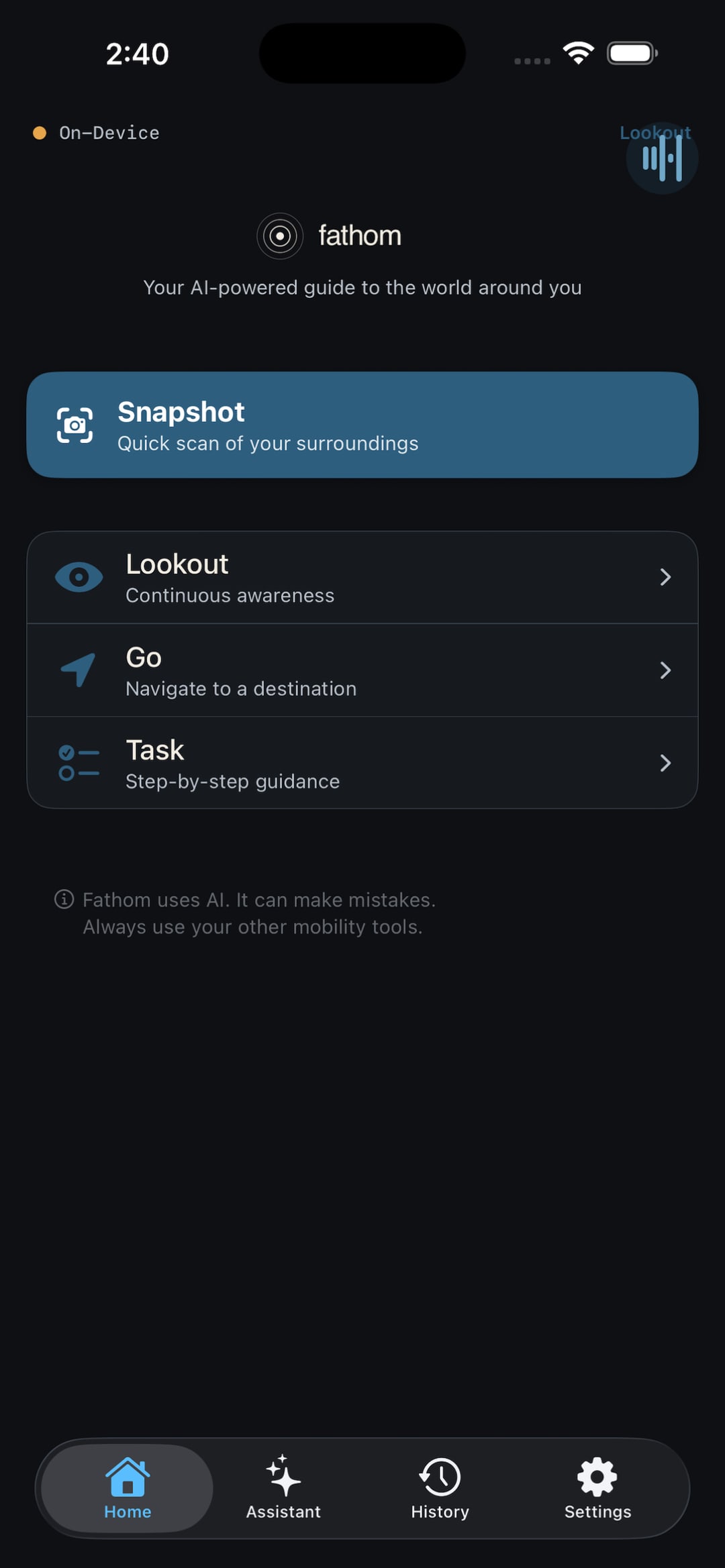
Fathom is one companion with a single design language across sight, sound, and touch, expressed through a handful of modes plus an assistant you can talk to. Each one does a different job, but they're built to feel like the same thing, switchable by ear in a couple of seconds.
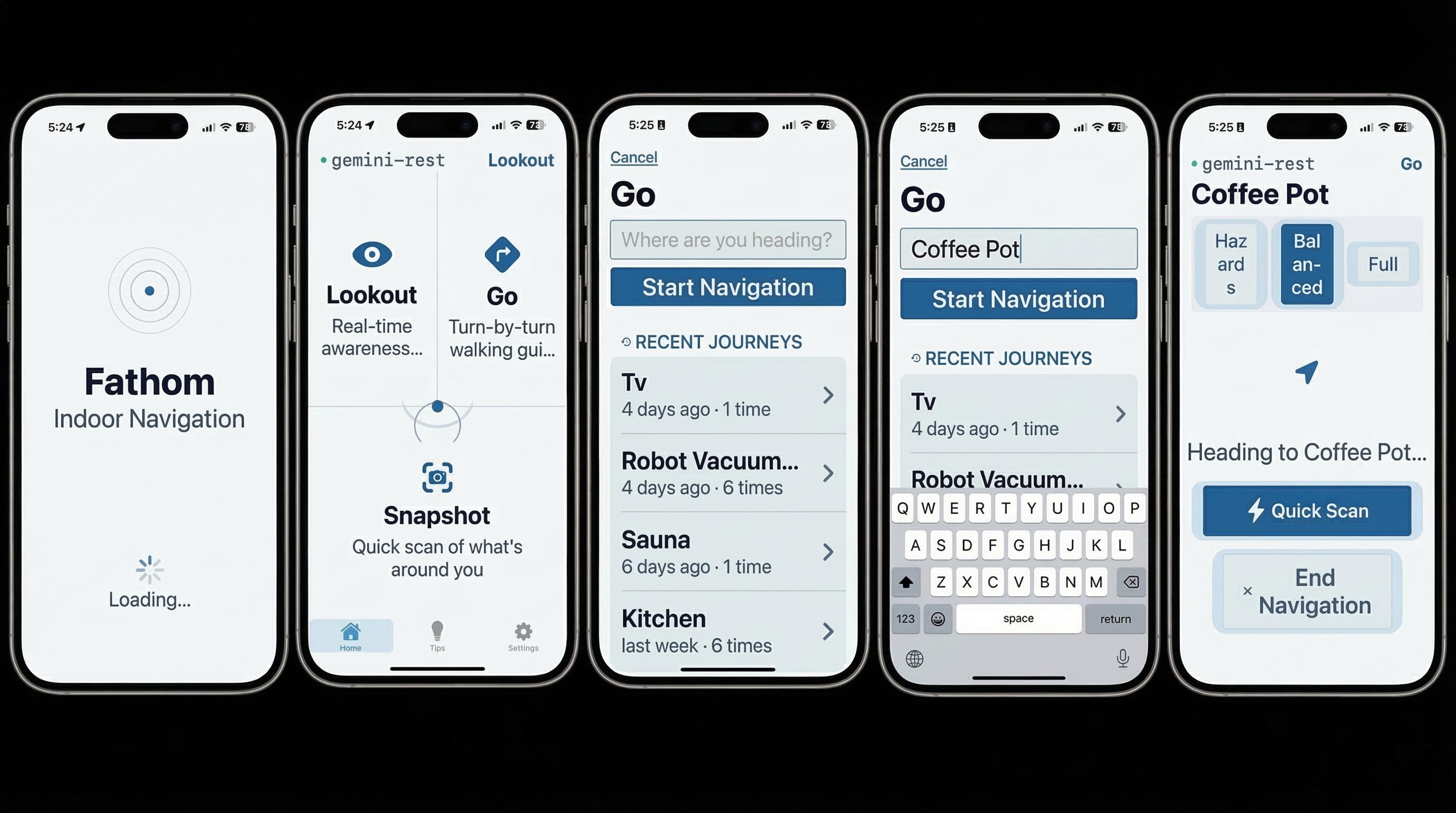
Fathom 1.0 on the App Store: one companion across Snapshot, Lookout, Go, and Task, plus an Ask-Fathom assistant. Built VoiceOver-first, with high-contrast, large-target UI.
Lookout — silence as interface
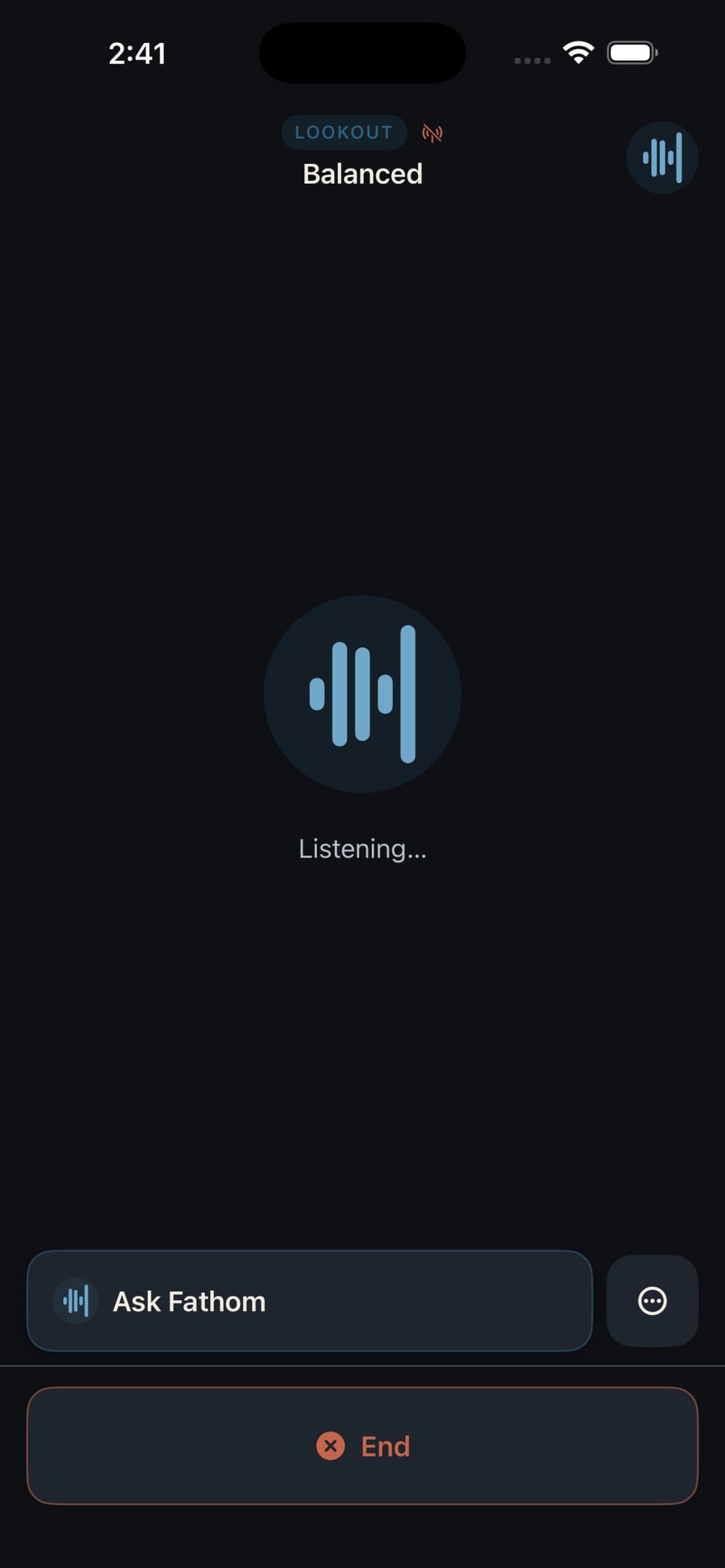
Lookout is the heart of the app. The AI watches the camera feed continuously but only speaks for things that matter: a step, an obstacle at head height, someone on a collision course, a change in the floor. Short alerts in clock-face directions, and silence the rest of the time. On-device LiDAR runs underneath as a second layer that doesn't need the cloud, picking up step-downs and drop-offs by depth. A status pill shows when Fathom is running entirely on-device, and "Ask Fathom" lets you break in with a question without leaving the mode. People learn to trust the quiet within minutes. If it isn't talking, the way ahead is clear.
Snapshot — on-demand spatial context
One tap, from anywhere, fires Snapshot. The AI grabs a frame and reads the space back in a set order: what kind of room it is, then what's ahead, to the left, and to the right in clock positions, then the landmarks, signs, and people. Close things are measured in footsteps, farther ones in feet. It has three levels of detail (quick, standard, detailed) and bumps itself up a level in places you haven't been before. It's also wired to the iPhone's Action Button through a custom App Intent, so you can trigger it without finding anything on screen.
Go — wayfinding that arrives honestly
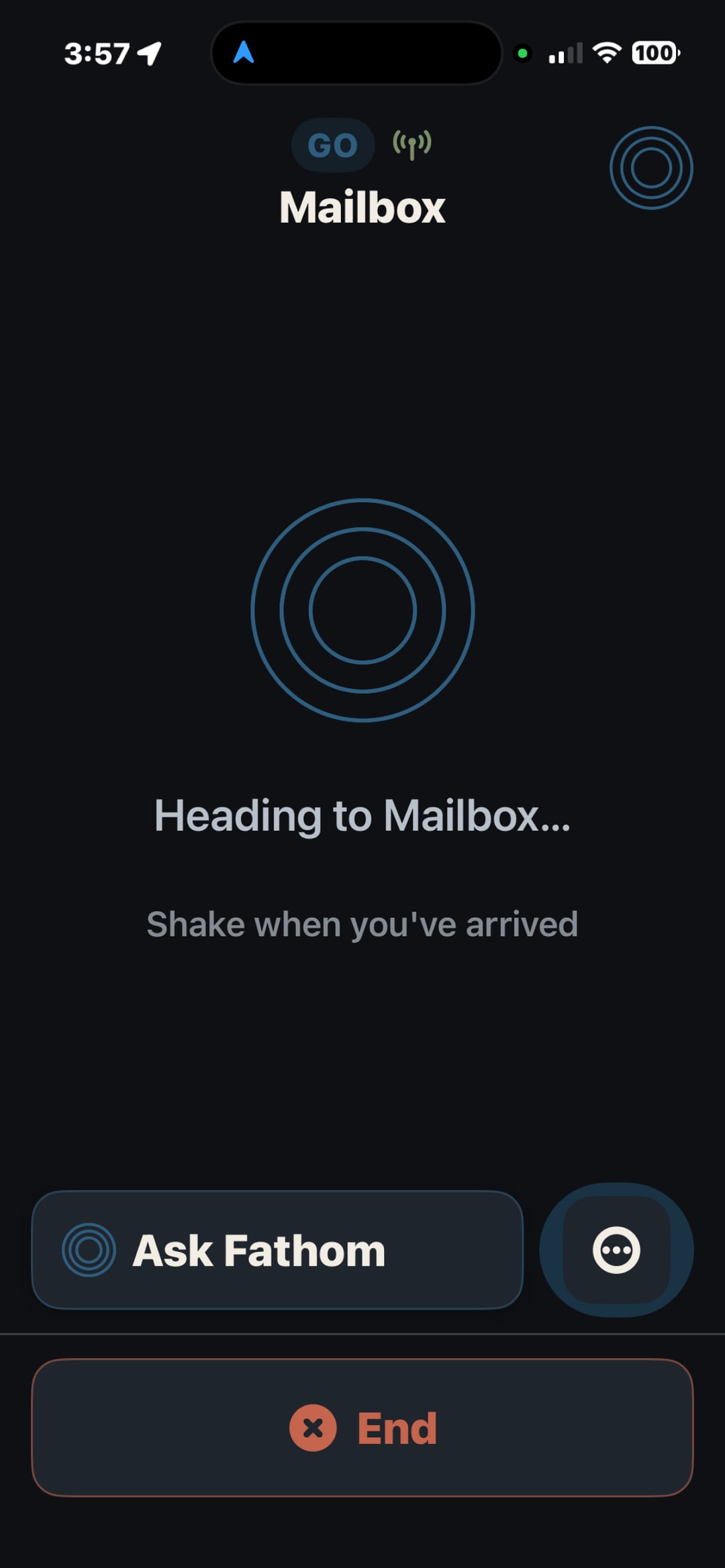
Speak a destination and Go walks you toward it, with proximity cues that quicken as you get close and an OCR pass reading the room numbers and signs you go by. The decision I care most about is how it handles arrival. For a place it can confirm from the signage, it confirms. For an object it honestly can't pin down from one camera frame, it won't pretend: it gets you to the right area and hands off with "reach out and feel for it, shake when you've arrived." A false arrival would break the trust the whole app depends on, so Go would rather be honest than impressive.
Task — a spoken goal becomes a plan
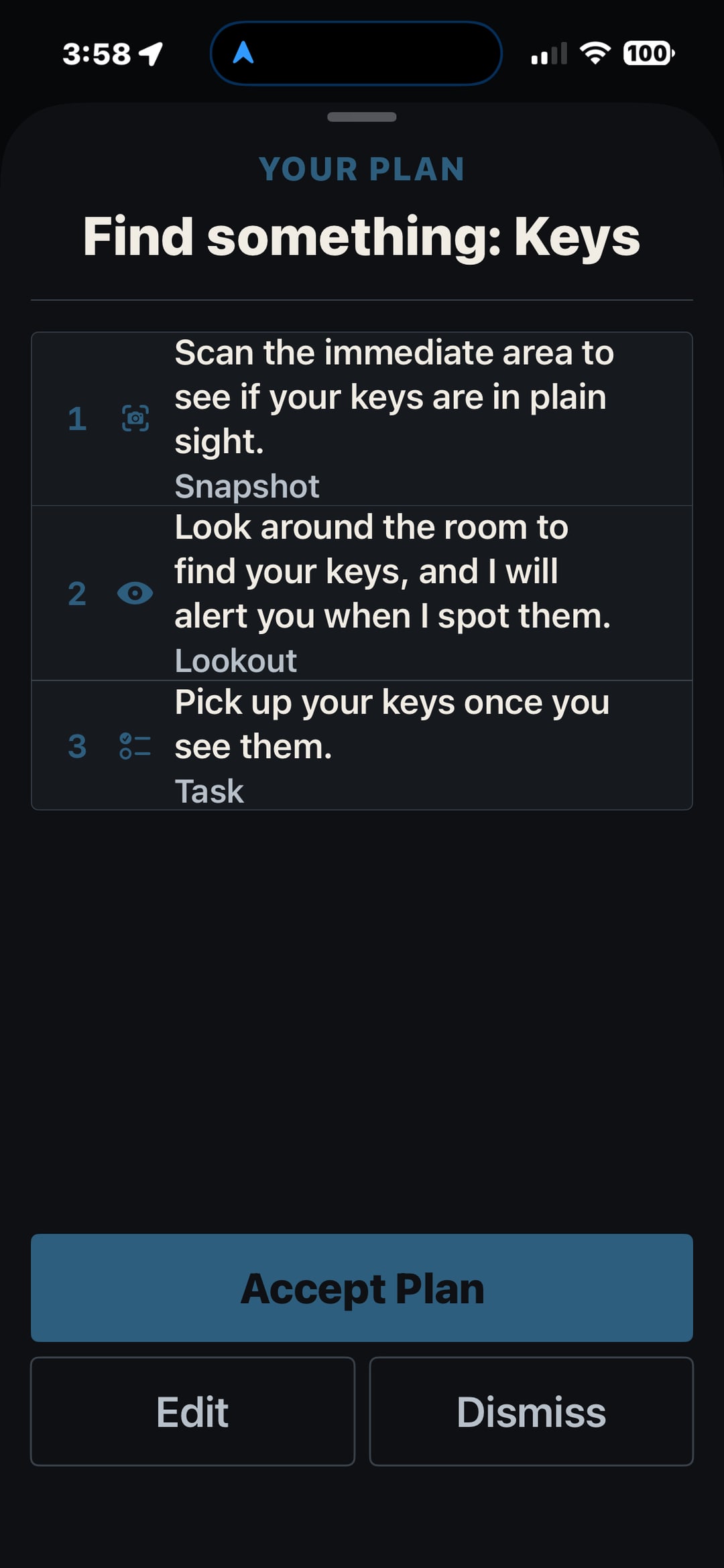
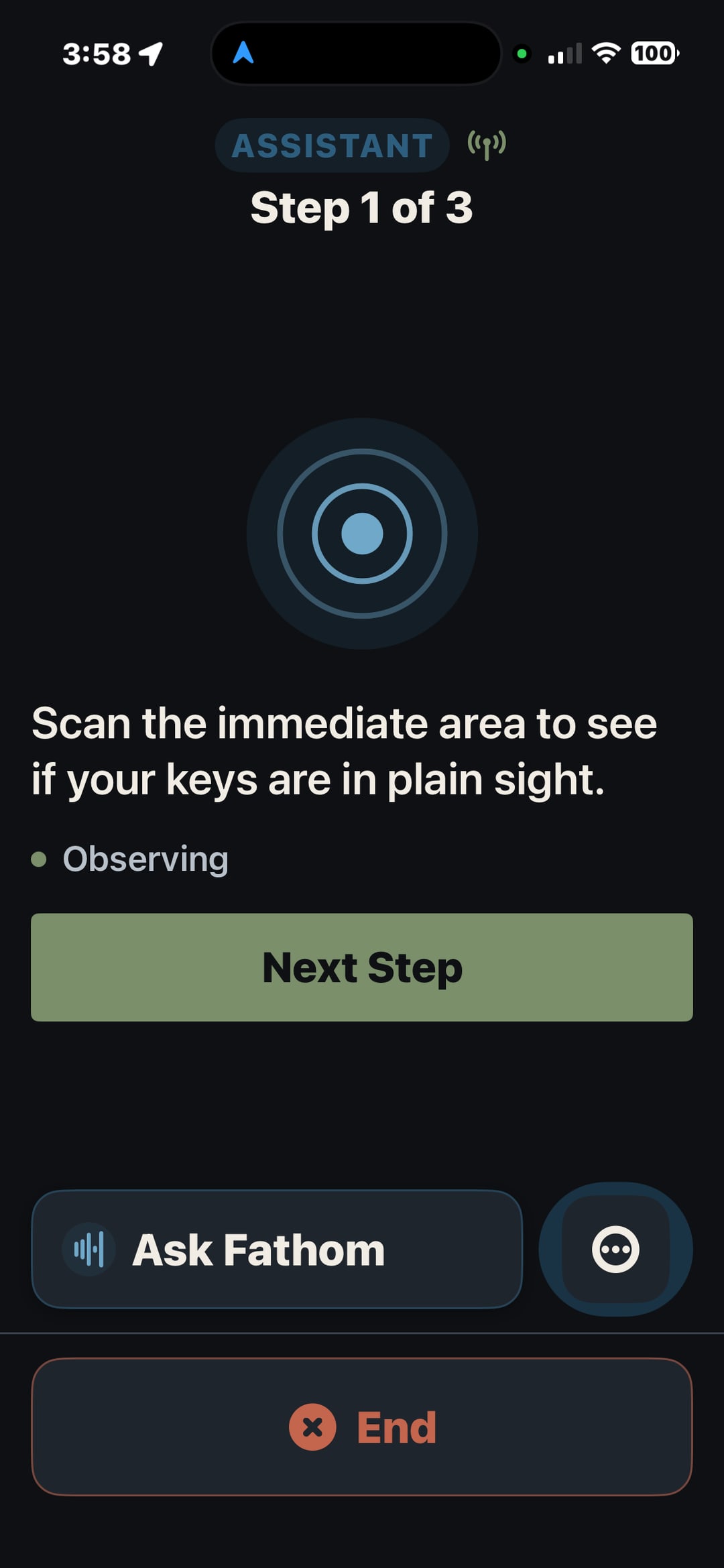
Task is where the modes come together. Say what you're after, like "find my keys," and Fathom lays out a numbered plan that strings the right tools together: a Snapshot to check the immediate area, Lookout to watch the room and call out the keys when it sees them, then a step to pick them up. You can accept, edit, or dismiss the plan before anything runs, and then it works through it one step at a time, telling you where it is out loud. It takes a vague intention and turns it into a sequence a blind user can actually follow, with the app deciding which mode handles each part.
Assistant & Live Task — just talk to it
The Assistant is the conversational layer, "Ask Fathom," reachable from anywhere in the app. Live Task takes it further: a real-time, two-way session where the AI sees what your camera sees and talks you through a task as it happens. Your speech is transcribed on the phone, so only text goes to the model and no raw audio ever leaves the device. The streaming session has a hard time limit, so Fathom quietly rotates the connection and carries the context across the seam, and the conversation just feels like one continuous exchange.
A safety net that never goes quiet
Underneath every mode runs an on-device safety net: YOLO11 object detection, plus LiDAR depth on Pro phones, firing instant haptic alerts for obstacles. The one promise it makes is that those alerts never wait, not for the AI to finish speaking, not for a mode change, not for the network to come back, not even for the monthly cloud budget to refill. If the cloud drops, narration stops but obstacle and depth sensing keep going. Safety signals are instant; the talking can take a beat. That order of priority is more or less the whole philosophy of the app.
What each mode delivers
The free-to-Plus split lands exactly where cloud cost rises.
Fathom capability by mode. Snapshot and Lookout are free; Go, Task, and Assistant require Fathom Plus. The on-device safety net runs under every mode, never gated by tier, network, or budget.
| Capability | SnapshotAction Button | Lookout | Go | Task | Assistant/ Live Task |
|---|---|---|---|---|---|
| What it does | One-shot scene description on demand. | Continuous awareness; speaks only for hazards. | Turn-by-turn indoor wayfinding; reads signs. | A spoken goal becomes a numbered plan.ChainsSnapshotLookoutGo | Ask Fathom; real-time two-way camera + voice. |
| AI channel | Gemini REST · one-shot | Gemini REST · economy | Gemini REST · premium | Gemini REST · step executor | Gemini Live · WebSocket |
| On-device safety net | Always on — YOLO11 + LiDAR + instant haptics. Never gated by tier, network, or budget. | ||||
| Tier | Free | Free | Plus | Plus | Plus |
Free
One-shot scene description on demand.
Gemini REST · one-shotContinuous awareness; speaks only for hazards.
Gemini REST · economyFathom Plus
Turn-by-turn indoor wayfinding; reads signs.
Gemini REST · premiumA spoken goal becomes a numbered plan.
ChainsSnapshotLookoutGoGemini REST · step executorAsk Fathom; real-time two-way camera + voice.
Gemini Live · WebSocketLiDAR depth on Pro devices; YOLO11 on all devices.
How Fathom works
Inputs
On-device
↳ raw audio stays here
Safety net · always on
Cloud AI
Outputs
User flow — Task
Task isn’t a fourth mode — it’s an orchestrator. One spoken goal becomes a reviewable plan whose steps each run a different mode.
Speak the goal · on-device
“Find my keys”
transcribed on-device
Cloud AI
Fathom drafts a plan
Example plan — steps are generated per goal
Accept starts the session · Edit revises by voice or text · Dismiss returns to the goal
Execute — one step at a time
Spoken progress · “say done” or shake to advance
Safety net · instant obstacle haptics, always on
On-device LiDAR depth → haptics · never gated by the AI or the network
Results
Fathom: Visual Assistance is live on the App Store: version 1.0, iPhone, free to download, no account required. Getting there meant getting past App Review, which turned the app down three times. Once for missing subscription legal links. Once for not asking consent before sending data to a third-party AI. Once for a completeness bug in the camera-permission flow. Each rejection made the app better, and the consent one most of all, since it's what pushed me to enforce privacy at the network boundary instead of behind a screen.
The core bet held up. Real-time AI vision through a phone camera, paired with on-device depth, gives blind and low-vision users genuinely useful awareness and indoor wayfinding, under two seconds from camera frame to spoken alert. And the on-device safety net of YOLO11, LiDAR, and haptics keeps working when the network drops or the budget runs out.
A product designer who started out knowing nothing about Swift, mobile hardware, or AI integration shipped a production-quality native iOS app, roughly 50,000 lines across 200+ files, through App Review, working solo. What made it possible was pairing fifteen years of design methodology with agentic development. The artifacts that have always driven good work, the PRDs and research synthesis and information architecture and system prompts, mattered more here, not less. They were how I told an AI that could write Swift what a blind user actually needs.
Next up is a wider pilot with blind and low-vision testers recruited through accessibility organizations, judged against clear exit criteria: can people finish tasks without help, does it stay crash-free, and does VoiceOver hold up across different devices.
Further out, the bigger unlock is getting the camera off the phone. I'm exploring letting people pair wearables, like smart glasses, a clip-on camera, or a pendant, so Fathom can work hands-free, with a cane in one hand and nothing in the other. More than that, several camera sources at once could give it a wider, steadier read of a space than a single phone held at chest height ever can. The hard part isn't the vision model; it's that iOS keeps third-party camera streams at arm's length, so most of the work is finding the right hardware and a dependable way in.
Reflection
Lived experience is research, not bias
Having LHON doesn't make me the user. Visual impairment is a huge spectrum and my experience is one point on it. What it gives me is a calibration secondary research can't. I can feel the difference between an interface that looks accessible and one that actually works when you can't see it clearly, and that made every community conversation sharper, because I knew which questions to ask.
Silence is the hardest thing to design
Here's the counterintuitive part: the most important feature of a product for blind users is knowing when not to speak. Every instinct says give them more. The community taught me that confidence grows in the quiet, and getting that silence right took more iteration than any visual component I've ever made.
System prompts are the new component library
In an AI-native product, the system prompt is the primary design surface. I iterated on Fathom's prompts the way I'd iterate on a design system, with explicit rules, anti-patterns, and a defined personality. The most important part of the Lookout prompt is the section on what does NOT trigger speech, not the part on what does. Designing the negative space of an AI's behavior is a skill that barely existed two years ago.
Agentic workflows amplify rigor, they don't replace it
The speed came from AI. The quality came from the same things I'd lean on for any product: a real PRD, detailed specs, architecture reviews, testing on device, feedback from the community. Claude Code let me move faster, but the app is good because I did the design work first. Those artifacts didn't matter less in an agentic workflow. They mattered more, because they're the structured context the AI needs to give you something useful.
Design for the full spectrum, not the average
Fathom works for someone with no light perception and someone with 20/200 acuity, not through separate modes but by giving every interaction a visual, an audio, and a haptic version. Turn on the low-vision settings and the touch targets grow to 56pt and the contrast climbs, but the information architecture stays put. It's the same app for everyone. That's what accessibility-first actually means.
Build the thing that lets you swap the thing
The AI abstraction layer was more work upfront, but it means Fathom isn't a Gemini app. It's a navigation app that happens to use Gemini today. When something better ships next month, switching is a config change. Anything built on AI right now needs that kind of independence from any one provider just to keep up with how fast the ground moves.
Knowing enough beats knowing everything
Coming into Swift without an engineering background felt like a liability. It wasn't. The goal was never to become an iOS engineer. It was to know enough to make real architectural calls, to catch bugs that looked fine, and to understand why a given approach would or wouldn't hold up for a blind user crossing a building with the phone at chest height. That's a lower bar than mastery, and it was the right one. The design skills showed up in the strangest places: information architecture maps almost straight onto service-layer design, and thinking in user flows turns out to be thinking in state management.
Performance is a UX problem
Every performance decision in Fathom is also a UX decision. Frame rate sets how often it detects. Memory management decides whether it crashes after twenty minutes. Thermal management decides whether someone can cross a large building before the phone overheats and throttles. These read like engineering concerns until you remember who's leaning on the app, and where, and then they're plainly accessibility constraints. Optimizing performance on a device someone carries all day isn't about benchmarks. It's about staying reliable in the real world, which is a design requirement.
An honest "I'm not sure" beats a confident wrong answer
The instinct in an AI product is to always have an answer. For a blind user crossing a building, a confident wrong answer is worse than none. A false "you've arrived" or an invented distance can put someone in danger. So Fathom is built to admit when it doesn't know. Go gets you to the area and asks you to feel for the object instead of faking a pinpoint, and the narration leans on a real LiDAR distance instead of a guess. Teaching the system to say less, and to say "not sure," was harder than getting it to say more.
Shipping is a discipline, and review is part of the design
Three App Review rejections taught me more about the product than any internal test did. Provisioning, privacy manifests, the privacy nutrition label, the distance between what the app does and what its metadata claims: none of that exists in development, and all of it is real gatekeeping. The lesson that stuck came from the consent rejection. Privacy has to be enforced where data actually leaves the device, not on a screen the user might never see. Seeing Apple's review process from the inside changed what "done" means to me for a native app, and the version that shipped is genuinely better than the one I first sent in.